Plaso for Windows Part 3

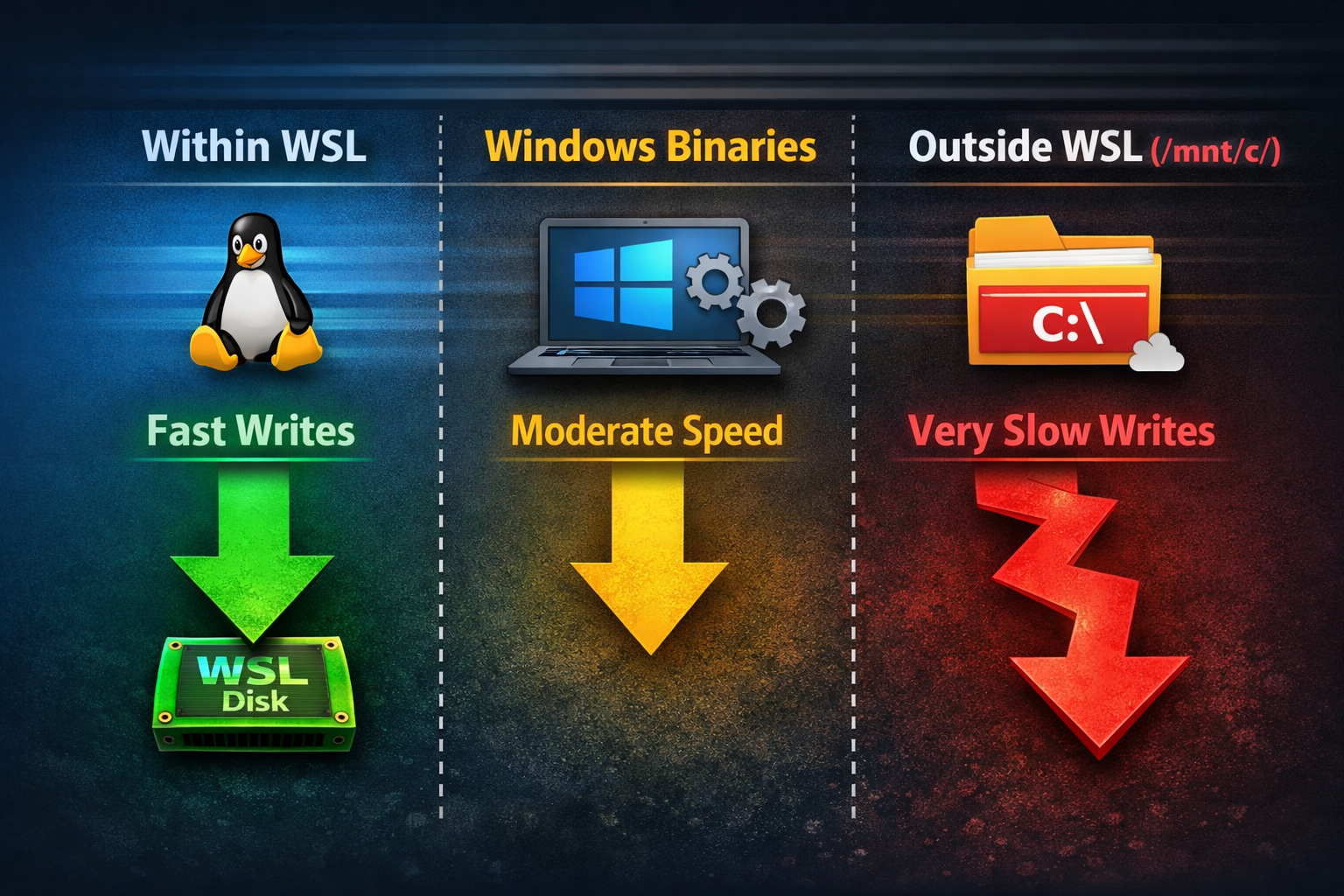
Bottom line up front, I was using WSL wrong. Hundreds of thousands of small write operations that leave the WSL2 filesystem are almost unusably slow. Reads are mostly fine, and large writes can be tolerable — but write-heavy workloads crossing that boundary are a problem. Somehow I never put this together. I have typically used my WSL instance as the place that stores the tools, and my larger Windows drive as the place that stores the data. I can write a CSV timeline to /mnt/c/wherever/ and immediately open it with TimelineExplorer—why wouldn't I do that? Turns out when I write the Plaso storage file out to /mnt/c/... I'm doing things in the worst way possible. Allow me to demonstrate how bad this is via a language we all speak: Excel.
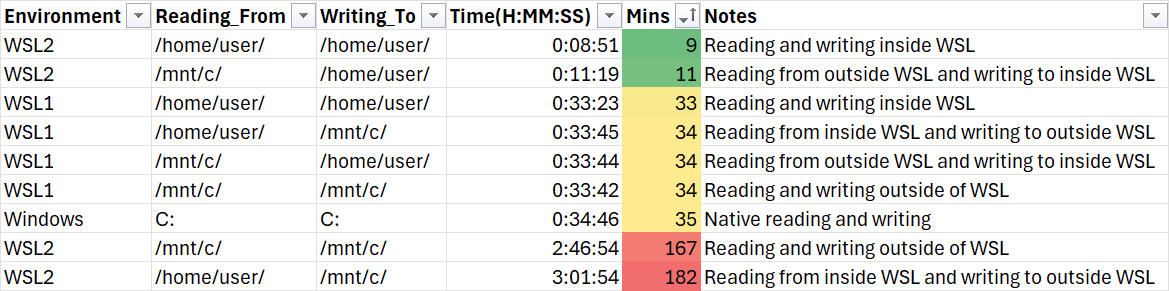
Look at that ABSOLUTE NOSEDIVE. Out of the 9 different methods I could come up with to run Log2Timeline, I didn't just pick a bad one, I aimed for the STARS!
I'm not exaggerating when I say I probably built those Windows binaries 50 times over the weekend. Not every one was successful, but more and more were towards the end. I ran them on my Intel laptop. I ran them on my AMD desktop. I ran them in VMs. I ran them against Windows and Linux images. I certainly didn't test everything, but I was confident in the results I did have. So as I published this, I sent it over to Richard Davis of 13Cubed who called me the next morning to tell me WSL was still faster... wait what!? After a bit of back and forth and sharing commands it became obvious.
I felt a little like the QA engineer:

So is all this useless?
I admit, I was a little crestfallen that I hadn't unlocked some magic. However, the Windows binaries are still within error margins of being just as fast as the four WSL1 scenarios. It's still much faster than writing to the Windows disk, and it's only slightly slower than the fastest two. I think I can use the term slightly because 25 minutes slower is a LOT better than 2+ hours slower.
I think this is still useful where you might not have WSL or a Linux system for some administrative or technical reason. Or you might not be able to write what can be reasonably sized files to your WSL instance. It's obviously still useful to Windows applications like Autopsy if they ever want to pick it up. I even noticed that there are edge cases where the Windows binaries can be faster. Tiny images on my VM being one of them, and I'm wondering if this has something to do with nested virtualization finally causing a hit.
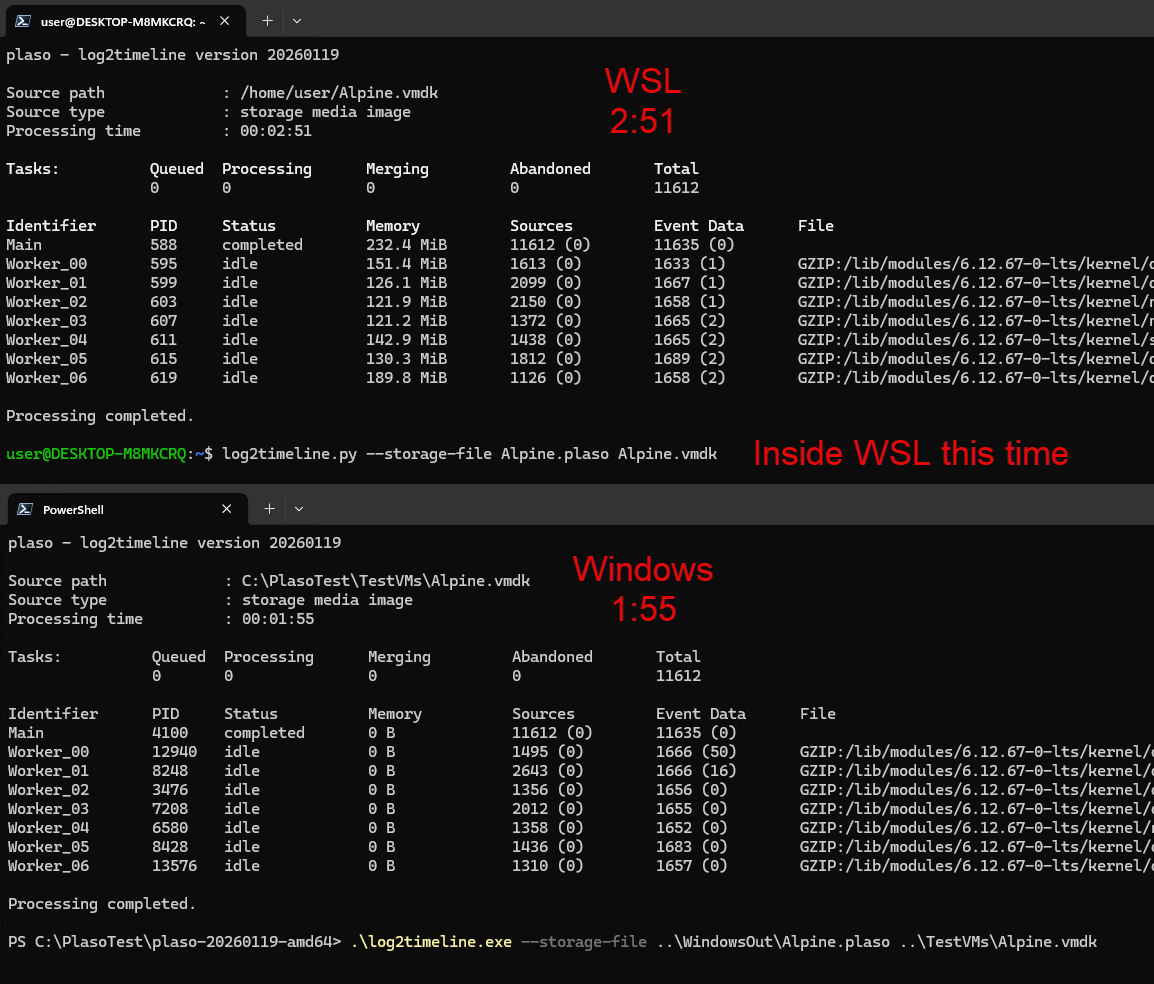
So no, I don't think anything has really changed. This is less spectacular, and maybe a little less useful to most people. I still think it has its place though, and I'll try to continue making builds and hoping someone actually takes up maintenance.
Why is WSL2 like this?
WSL1 used a translation layer that turned Linux syscalls into Windows syscalls. So Linux syscall -> Windows syscall -> Disk. However, WSL1 wasn't a real Linux system. You can still install WSL1, go do that, spin up an Ubuntu 24.04 image, and run apt update && apt upgrade and watch it break. WSL2 is Linux running in a VM, the disk is an ext4 disk and it gets (very near) the native write speeds that a Linux system would get. However, this means it needs to share out files like you might do with a network share (e.g. Samba/SMB) to cross that boundary. The choice was to go with 9P though, for... reasons... as the method of transferring files from one side to the other. So now it's more like (near as I can tell, probably have the details a bit wrong) Linux process -> 9P client -> Windows host service -> Windows syscall -> disk. Linux having to hand off to a client that talks to a Windows service that finally writes to NTFS does a lot of damage apparently.
The good news is that the WSL development team knows about this, aren't happy with the performance either, and it's one of the biggest areas they are investing in and working to improve.



In all seriousness, even with the write operations performance hit, WSL is the best thing to hit Windows since... honestly I can't think of anything better. There's certainly been bigger changes under the hood, but nothing impacted the way I use the OS like WSL. So while I do hope for those improvements, I'm still thankful to the WSL team.
References:
- https://vxlabs.com/2019/12/06/wsl2-io-measurements/
- https://www.reddit.com/r/bashonubuntuonwindows/comments/e7ce9s/filesystem_performance_comparison_between_wsl1/
- https://en.wikipedia.org/wiki/9P_(protocol)
- https://allenkuo.medium.com/windows-wsl2-i-o-performance-benchmarking-9p-vs-samba-file-systems-cf2559be41ac
- https://github.com/microsoft/WSL/discussions/9412